Azure Rights Management System

Data Security

Microsoft Azure Rights Management Services and Azure Rights Management help protect sensitive files and emails using encryption, identity, and access policies across PCs, tablets, and mobile devices. As organizations operate beyond traditional perimeters and data flows between users, apps, and cloud services, security travels with the data itself ensuring consistent protection both inside and outside organizational boundaries.

Protection from the start

Protect data at the time of creation or modification from the source.

Once data is labelled, optional protection can be applied based on the requirement.

Simple and intuitve controls

Data protection controls are integrated into Office and common applications.

This provides one-click options to classify data they are working currently

Safer sharing

Persistent protection with your users as well as with your customers and partners.

Users can define who can access data and what they can do with it based on the use of rights policy.

More visibility & control

Users can track activities on shared data and revoke access if necessary.

IT can use powerful logging and reporting to monitor, analyze, and reason over shared data.

Typical Network Security vs Rights Management System

There is control over your data inside your network boundaries. Once it leaves your network, you lose the ability to protect or track it.

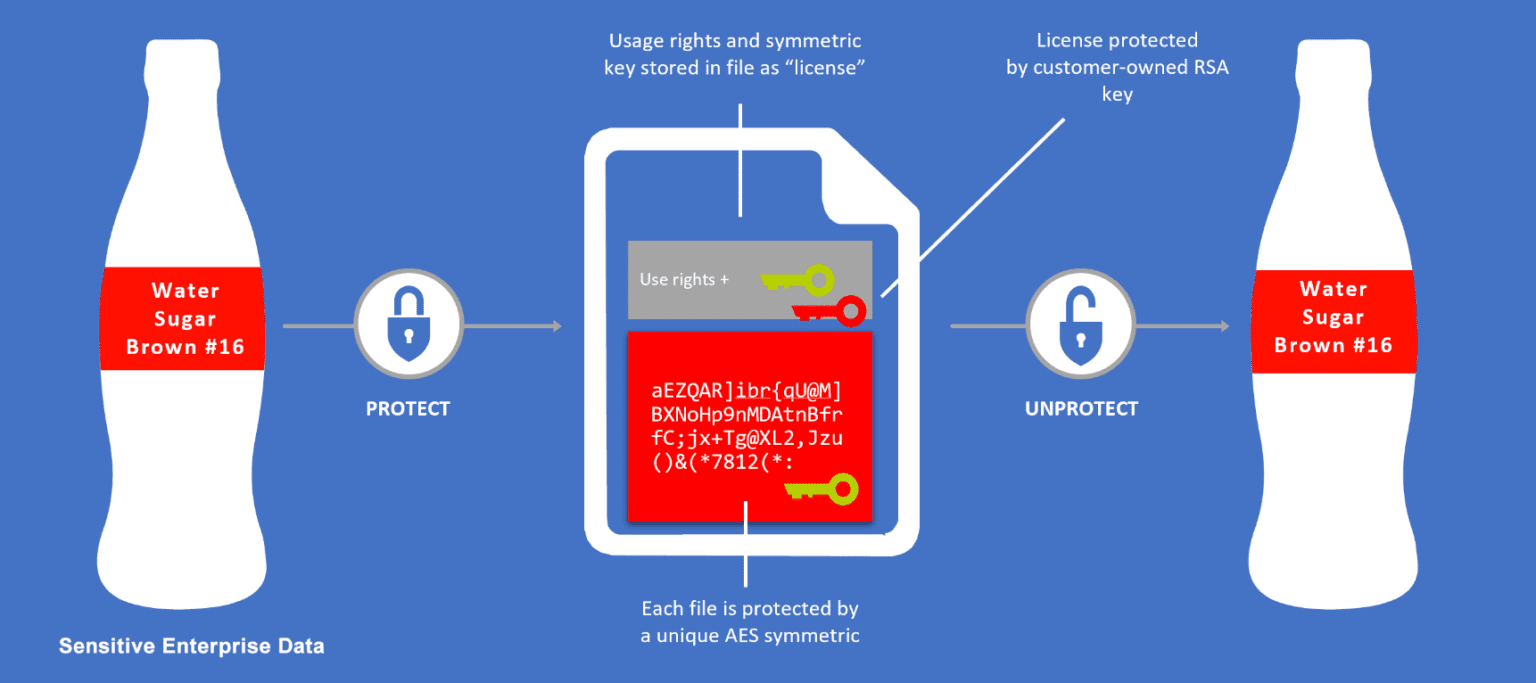
Rights Management System (RMS) allows you to classify and add security directly to your sensitive data so that its always protected and identifiable.

How Azure RMS Works

According to the Identity Theft Resource Center, from 2005 to 2019, agencies and companies suffered 10,939 data breaches, exposing 1.65 billion records.
Data breaches in the U.S. are vastly more expensive costing USD 8.19 million (about ₹56.46 crores), or more than double the average for worldwide companies stated in the study conducted by the Ponemon Institute.
As per THG Publishing, an average of 35,636 records were compromised per breach in India, with total breach costs averaging ₹12.8 crores between July 2018 and April 2019, according to an IBM-sponsored report.

Other Key Features:

  • Meet your compliance and regulatory requirements, including FIPS 140-2, HSMs, ISO/IEC 27001:2013, SOC, HIPAA BAA, EU Model Clause, PCI DSS, and more.
  • Protect data at the time of creation or modification with AES 256 bit encryption.
  • RMS provides one-click functionality to classify data they’re working on.
  • Data protection controls are integrated into Microsoft Office and other common applications.
  • Block Copying / Pasting / Screenshots and Printing.
  • Share data safely with users within your organization as well as with your clients and partners.
  • Users can define who can access data and what they can do with it based on the use of rights policy.
  • Users can track all activities on shared data and revoke access if necessary.
  • Analyze data flows to gain insight into your business.
  • Detect risky behaviors and take corrective measures.
  • Track access to documents & prevent data leakage or misuse.
  • IT can use powerful logging and reporting to monitor, analyze, and report on the shared data.

Success Stories

Managing Risk in Modern IT

As IT environments grow more complex, managing risk becomes increasingly critical. Explore our case studies to learn how organizations approach governance, compliance, and operational risk.

How Secure Remote Access Was Enabled Using Azure Virtual Desktop

Azure brought smiles to Smile Design by migrating legacy applications to a secure cloud

Let’s get your data secured with

Azure Rights Management System (RMS)

Frequently Asked Questions

Azure RMS is a cloud-based information protection service used by Azure Information Protection and Microsoft Purview Information Protection. It helps secure files and emails across devices using encryption, identity, and authorization policies.
When you protect a document, Azure RMS encrypts it using a unique content key, embeds a usage policy, and ties the content key to your organization’s tenant key. Only authorized users or services can decrypt and access the data.
No. Azure RMS does not store or inspect your content. Encryption happens client-side. Your data remains encrypted unless you explicitly upload it to Azure or another cloud service.
Azure RMS natively protects a wide range of file types—including Office documents, PDFs, images, and more—and applies generic protection for all other types. It works across Windows, macOS, iOS, and Android devices.
Yes. Azure RMS is the protection engine underpinning Azure Information Protection (AIP) and now integrated with Microsoft Purview Information Protection (MIP), providing classification, labeling, and protection capabilities.
Absolutely. Azure RMS supports BYOK, allowing organizations to supply and manage their own tenant keys, secured within Azure’s Hardware Security Modules (HSMs).
Azure RMS supports seamless B2B sharing—no manual trust setup is needed. External users authenticate via Microsoft Entra ID, sign up for RMS for Individuals, or use one-time passcodes for access.
  • If using a label or template, you can update permissions without reprotecting. Updates take effect immediately or when the user’s license expires.
  • If the document used custom permissions, reprotection is required to change rights

Connect with Top Talent to Shape the Technological Landscape - Contact Us!

Schedule a meeting with our experts or fill out the form for a free assessment of your environment today!

*Cloud 9 reserves the right for free
assessment eligibility.